 UnfoldMyMac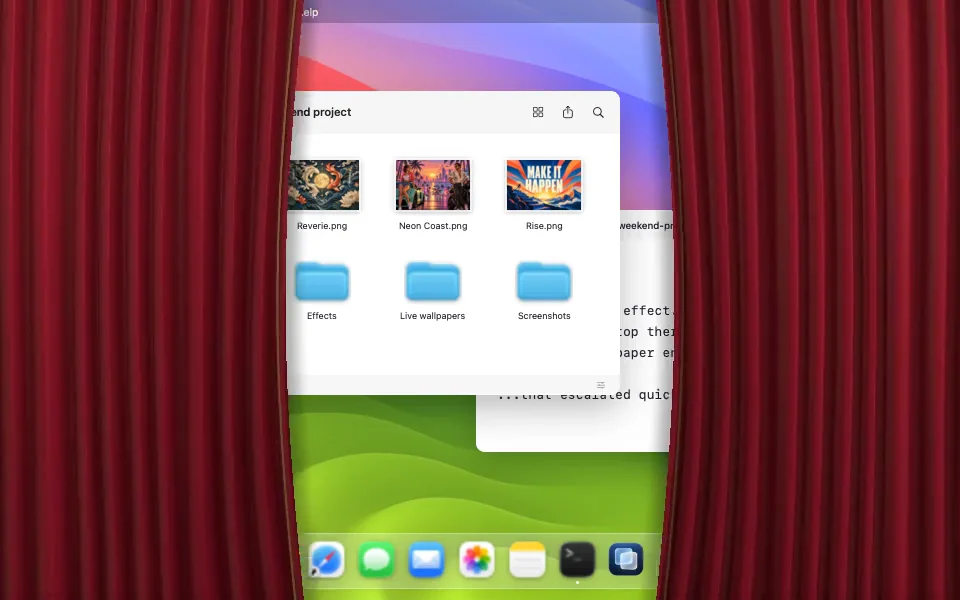
Close the MacBook a little and the curtains move in. Open it again and they pull apart. The effect follows the lid’s position, so you can stop halfway and leave the desktop half covered.
UnfoldMyMac reads the lid angle and maps it to an effect’s progress. It uses an undocumented Apple HID report, which means support varies by model. The app’s --probe command is the way to check a particular Mac; a list of untested models would be guesswork. The project README documents the hardware requirement.
Choose where the effect begins
The default activation angle is 125°. Above that angle, the effect is clear. As you close the lid past the trigger, it begins covering the built-in display. You can choose a whole-degree starting angle from 60° to 180° in Effect settings, or use the current position of your lid.
The finish point is a separate control. By default, the effect completes after 80% of the closing travel from the trigger. That leaves the final 20% with the image already assembled or the curtains already closed. You can move this finish point between 40% and 100%.
These values come from the app’s calibration documentation, and the manual preview uses the same calibration.
Try it before enabling it
Open Lid Effects and browse Glass & Light, Motion & 3D, or Image Art. Search creators and tags, then use Adjust for grouped appearance controls and credits. Effects start disabled. Pick a design and use Preview to play, pause, or scrub it on your desktop. If the lid sensor is unavailable, manual preview still works where the built-in display passes the app’s safety checks.
The browser demo on this website is an illustration controlled by a slider. It does not read your MacBook’s lid sensor. The recordings in the showcase come from the app’s renderers.
Different effects do different jobs
Frost blurs the live desktop. It needs Screen Recording permission because it uses desktop frames, which stay in memory. Switching away from Frost stops that capture. Veil uses a native translucent material, while Fade dims the display.
Curtains, Current, and Peekaboo add motion and character. Image effects let you bring in your own artwork and choose a reveal style. Overlays let clicks through, so the effect does not become a second interface you have to dismiss.
Your built-in display sets the boundary
Lid effects stay on the MacBook’s built-in display. They pause if that display is closed, asleep, unavailable, or mirrored. Live wallpapers have their own playback system: the app draws them on the primary display, and on macOS 26 System Settings can assign a scene to each display.
Reduce Motion stills continuous animation while lid and manual control remain available. Reduce Transparency uses dimming without capture. Read the compatibility answers before setting up your first effect.