 UnfoldMyMac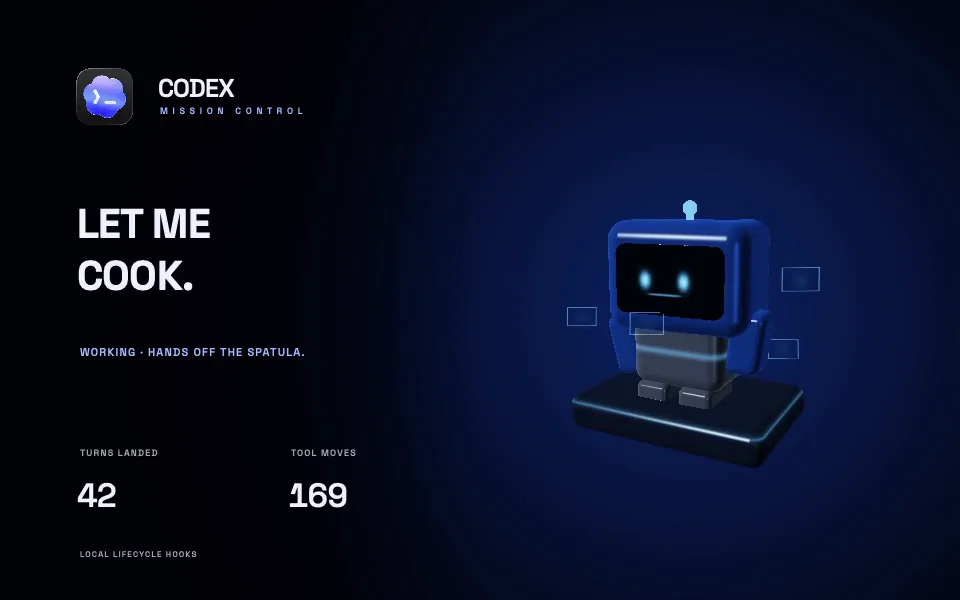
A wallpaper can show coding activity without pretending to know what you are working on. In UnfoldMyMac, data connections provide specific inputs: Mac metrics, local session metadata, lifecycle events, public GitHub data, NOAA space weather, or your own snapshots.
Open a design in Dynamic Wallpapers or Creative Scenes, then choose Customize below its preview. Feature badges identify its inputs before you connect anything. You can browse and preview before connecting personal data; required setup opens before applying a design. The README’s data section describes the available sources.
Mac metrics come from your Mac
Pulse can respond to CPU load, memory estimates, and battery information. These values give the scene something to react to. Treat the memory figure as an estimate, as the app documentation does, rather than substituting it for a diagnostic tool.
Local coding activity needs an explicit connection
Claude and Codex sources read activity metadata from local files. Lifecycle connections require their own hook setup so a scene can respond to states such as working, waiting for approval, and finished.
Codex Foundry reads retained local session and token metadata. Codex Mission Control uses lifecycle hooks to animate its robot as work changes state. Those are separate connections, and you can choose which to enable.
Codex hooks drive live work states
In the app, open Codex Mission Control → Set up → Install hooks. The installer adds its handlers to ~/.codex/hooks.json, keeps your other handlers, and saves a backup first. Then review and trust the installed hooks in Codex /hooks.
The connection follows these events:
UserPromptSubmit,PreToolUse, andPostToolUseput the scene in its working state.PermissionRequesttells the robot you need to approve something.Stopmarks a completed turn;Interruptmarks an interrupted one.SessionStartandSessionEndmark session boundaries.
The active wallpaper reads local hook records once a second. Templates can use working and waiting counts, completed turns, tool events, status text, and a numeric state to change their appearance. With several sessions running, an approval request takes priority over a working state. A state expires after five minutes without another event.
The hook receiver saves identifiers, timestamps, and counters. It discards prompts, commands, and responses, and does not approve or redirect Codex work. The hook setup and data contract and activity provider describe what a new scene can use.
GitHub uses public information
Connect a GitHub username to use public repositories, followers, and recent public events. GitHub After Hours turns that profile into a small city. This connection makes network requests for profile data and avatars; it is not an offline source.
The app refreshes public profile data every five minutes. GitHub can delay public events by 30 seconds to six hours, so a push counter is not an instant activity signal. Private activity is outside this connection. See GitHub’s public events API documentation for the service’s behavior.
Aurora Observatory reads public space weather
Previewing or running Aurora Observatory fetches NOAA's public OVATION aurora forecast and planetary Kp readings. No account or personal data connection is needed. The app shares a five-minute cache across the preview and desktop views, and labels cached or stale readings when a feed is unavailable. The NOAA provider defines those states.
The auroral curtains are an artistic interpretation of the NOAA forecast, drawn around bundled NASA Earth Observatory imagery. This website plays a recording with a synthetic forecast and a sample Kp reading; it does not fetch live NOAA data.
The GTA VI countdown uses your calendar
GTA VI — Vice City Countdown calculates the remaining calendar days in your time zone from the release date bundled with the template. It does not contact Rockstar to update that date or require an account. The countdown implementation handles the date locally; Rockstar's site is the source for the current release announcement. The website recording freezes the calendar at September 12, 2026.
Public API data needs a snapshot adapter
To use another public API, write an adapter that maps its response into the engine’s snapshot format: a timestamp, numeric values, and text. An updating local JSON file can feed the tool namespace; an HTTPS endpoint can feed the http namespace. Point the template’s connection at that file or endpoint and bind the values you want to display.
The standard file connection reads once a second, and the HTTPS connection polls every five seconds while active. The adapter controls how often it calls the upstream API. Respect that service’s rate limits, cache its responses where appropriate, and report the age of the underlying reading. A raw public API URL works directly only if it already returns the expected snapshot format.
Snapshots must have a current timestamp, fit within 64 KB, and keep their keys inside the connection’s namespace. Values older than 15 seconds stop supplying live input. Keep credentials in the adapter or connector, outside the template. The snapshot example and provider guide covers the format and validation rules.
Bring a scene of your own
An imported JSON template can reuse an installed scene with different colours, text, and data bindings. A new Metal scene belongs in a template folder contributed to the app; imported JSON does not load custom shader code.
There is room for more than counters. A tide reading could move a harbour’s waterline. Weather data could change a greenhouse. Codex hooks could give a character a reason to stop, look up, and wait for you.
Share a sketch and the source you want to use in a wallpaper idea, or follow the template guide and send a pull request. Include sample data so someone else can try the scene before setting up a connection.
Some numbers are part of the scene
Grok’s hot takes and Lights Out’s lap counters are playful wallpaper-session counters. They are not Grok usage records or live race results. On this website, wallpaper previews use sample data throughout.
You can review the app’s capture, storage, and connection behavior on the privacy page, then enable only the connections you want.